



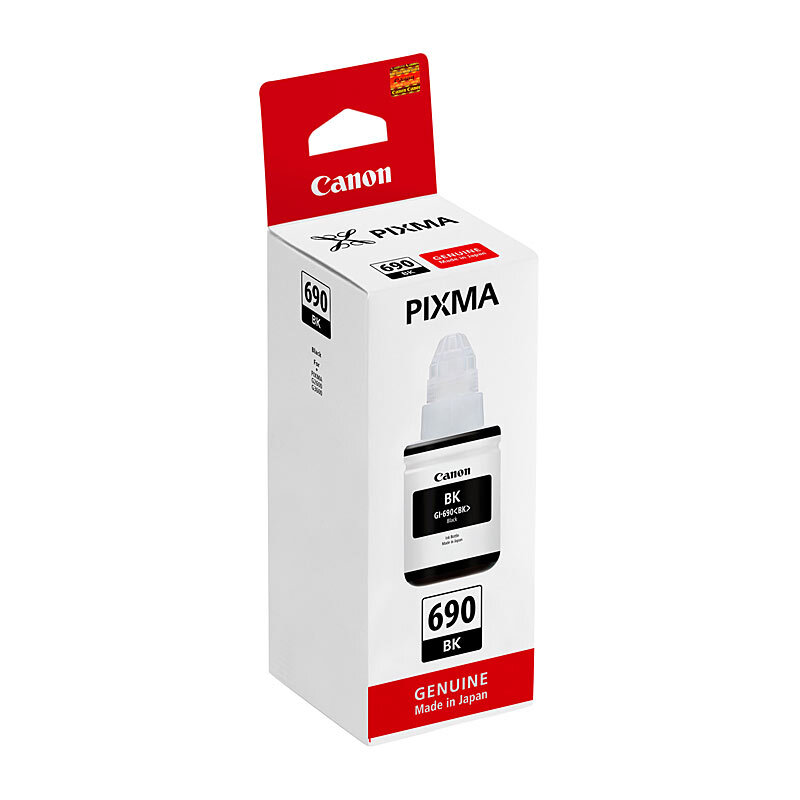
Canon GI690 Black Ink Bottle OEM
Canon GI690 Black Ink Bottle OEM (GI690BK)
This genuine CANON ink bottle is designed for the compatible printers listed below.
Why Choose This Original Ink Bottle?
- Original manufacturer product: A genuine CANON product.
- Compatibility: Check the listed printer models before purchasing.
- Local support: Your local Cartridge World store can help you choose the correct product.
Specifications
- SKU: GI690BK
- Type: Original Ink Bottle
- Brand: CANON
- Colour: Black
- Approximate Yield: Rated up to 6,000 pages
Compatible Printers
| CANON PIXMA G SERIES G2600 | CANON PIXMA G SERIES G2610 |
| CANON PIXMA G SERIES G3600 | CANON PIXMA G SERIES G3610 |
| CANON PIXMA G SERIES G4600 | CANON PIXMA G SERIES G4610 |
Please double-check your printer model for compatibility before purchasing. If your printer is not listed above, contact your local Cartridge World store and our team will be happy to confirm the correct product for your machine.
Cartridge Family
| Cartridge | CW SKU | Legacy SKU | OEM SKU |
|---|---|---|---|
| Cartridge World Canon Black Inkjet Bottle GI690 Black | I02-PC-B-GI690-SC | ||
| Cartridge World Canon Cyan Inkjet Bottle GI690 Cyan | I02-PC-C-GI690-SC | CWAZC690C | |
| Cartridge World Canon Magenta Inkjet Bottle GI690 Magenta | CWAZC690M | ||
| Cartridge World Canon Yellow Inkjet Bottle GI690 Yellow | CWAZC690Y | ||
| Canon GI690 Black Ink Bottle OEM | GI690BK | ||
| Canon GI690 Cyan Ink Bottle OEM | GI690C | ||
| Canon GI690 Magenta Ink Bottle OEM | GI690M | ||
| Canon GI690 Yellow Ink Bottle OEM | GI690Y |
Not all products in this family are compatible with every printer model listed above. Please check each individual product’s compatible printer list before purchasing.
Order Online Now
Order online now to have fast, efficient delivery right to your door, from your local Cartridge World store – with 120+ locations around Australia, there's bound to be one near you.
Actual yield may vary depending on printer model, page coverage, print settings and operating conditions.
Related Products

Canon GI690 Yellow Ink Bottle OEM

Canon GI690 Cyan Ink Bottle OEM

Canon GI690 Magenta Ink Bottle OEM


Canon GI55 Black Ink Bottle OEM

Canon GI66 Black Ink Bottle OEM