

If you have been curious about 3D printers but felt put off by the jargon, the calibration, and the fear of wasting hours on failed prints, you are not alone. For a long time, getting into the hobby meant learning to be a part-time mechanic. That has changed, and machines like the Bambu Lab P1S Combo 3D Printer are a big reason why. This guide uses the P1S Combo as a working example to explain the key concepts behind modern 3D printing, so that by the end you understand not just what this printer does, but why those features matter.
Rather than a straight sell, think of this as a lesson in what to look for in a capable desktop 3D printer, told through one of the most popular machines on the market.
First, How Does This Kind of 3D Printing Work?
The P1S uses a process called Fused Deposition Modeling, or FDM. It is the most common form of desktop 3D printing, and the principle behind it is refreshingly simple once you picture it.
A thin plastic thread, known as filament, is fed into a heated nozzle. The nozzle melts the plastic and lays it down in fine lines, building your object one thin layer at a time from the bottom up. Each layer fuses to the one below it, and gradually a flat pattern of plastic becomes a three-dimensional object. It is a little like a very precise, very patient hot glue gun guided by a computer.
The filament used is 1.75 mm in diameter, which is the standard size for this class of printer, and it comes on spools in a huge range of materials and colours. The quality of your finished print depends on how accurately the printer can move that nozzle, how well it controls temperature, and how stable the whole machine is while it works. This is exactly where the design choices in a printer like the P1S start to matter.
Why an Enclosed Chamber Makes a Difference
One of the first things you notice about the P1S is that it is fully enclosed, with a steel chassis wrapped in plastic and glass panels. This is not just for looks, and understanding why teaches you something important about the craft.
Different plastics behave differently as they cool. Basic materials like PLA are forgiving, but tougher, more useful engineering materials such as ABS and ASA are sensitive to temperature changes. If cool air hits them while they are printing, the plastic can shrink unevenly, causing layers to split or corners to lift off the plate. This is a common and frustrating failure for beginners on open-frame printers.
An enclosed chamber solves this by trapping heat and keeping the air around the print stable and warm. The P1S is built specifically for this, with controlled airflow and closed-loop cooling that keeps conditions consistent. The practical result is that you can reliably print with high-temperature materials that an open printer would struggle with, which opens the door to making durable, functional parts rather than just decorative models. This is also why the earlier Cartridge World blog on caring for filament and avoiding humidity matters so much, because stable conditions are the difference between success and a tangled mess.
The enclosure brings one more benefit. Printing some materials releases fine particles and odours, so the P1S includes an activated carbon air filter to reduce them, making it more pleasant to run in a home or office.
Speed, and Why It No Longer Costs You Quality
For years, 3D printing was slow. A moderately sized model could tie up a machine for the best part of a day, and pushing the speed usually meant sacrificing quality, with rough surfaces and visible wobble.
The P1S is part of a generation of printers that changed this. It can print at speeds up to 500 mm/s with high acceleration, which is dramatically faster than the older machines many people picture. The clever part is how it keeps quality high at those speeds.
The key technology here is vibration compensation. When a printer moves its nozzle quickly and then changes direction, the whole machine wants to shudder, and that vibration shows up as ripples on the surface of your print, an effect known as ringing. Vibration compensation measures those vibrations and adjusts the motion to cancel them out, so the printer can move fast without the tell-tale wobble. Combined with automatic bed levelling, which makes sure the first layer sticks down evenly across the plate, these features remove two of the biggest sources of failed prints. The machine handles the fiddly calibration that beginners used to have to learn by trial and error.
The AMS and the Magic of Multi-Colour Printing
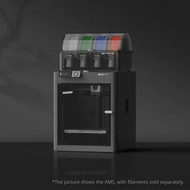
The word Combo in the name refers to the fact that this printer comes bundled with the AMS, which stands for Automatic Material System. This is the feature that most captures people's imagination, and it is worth understanding what it actually does.
A standard 3D printer prints in a single colour, whatever spool happens to be loaded. The AMS is an add-on unit that holds multiple spools of filament at once and feeds them into the printer automatically. This means the printer can switch between colours or materials mid-print without you touching a thing. A single AMS unit handles four spools, and the system can be expanded to support up to sixteen colours in one print.
The result is multi-coloured models, text and logos in contrasting colours, and designs that would be impossible to produce in a single pass. The AMS also enables clever material combinations, such as printing a support structure in a dissolvable material that washes away afterwards, leaving a clean finished part. For anyone who wants their prints to look finished rather than plain, this is a genuine leap in capability, and having it included in the Combo bundle is what makes the package so appealing.
What You Can Actually Make
Specifications are easier to appreciate when you connect them to real uses, and the versatility here is broad.
The P1S has a build volume of 256 by 256 by 256 mm, which is a generous cube of space that suits the vast majority of home and small-business projects. Within that space, and with support for materials including PLA, PETG, TPU, ABS and ASA, you can produce an enormous variety of things.
Hobbyists print models, figurines, board-game pieces, and cosplay props. Parents and teachers print educational aids and replacement parts for toys. Around the home, people print custom brackets, organisers, hooks, and fixes for the little things that break and are impossible to buy a spare for. Small businesses use machines like this for rapid prototyping, testing a physical version of a design before committing to expensive manufacturing, as well as for producing custom parts, jigs, and short production runs. The flexible material support means you can choose a soft, rubbery filament for a phone case or a tough, heat-resistant one for a functional bracket, all on the same machine.
The Features That Save You Time and Frustration
Beyond the headline capabilities, a good modern printer includes a set of quality-of-life features that quietly prevent disasters, and it is worth knowing what they are.
Filament run-out detection means the printer notices when a spool runs empty and pauses rather than carrying on and ruining a long print with thin air. Power-loss recovery means that if the electricity cuts out, the printer can resume from where it stopped rather than forcing you to start a multi-hour print from scratch. A built-in camera lets you monitor progress remotely from your phone and capture timelapse videos of your prints, so you can keep an eye on a long job without standing over the machine.
The P1S is also designed to be usable straight away, with Bambu Lab quoting a setup time of under fifteen minutes. It connects over Wi-Fi or Bluetooth and works with the company's own Bambu Studio and Bambu Handy software, as well as popular third-party slicers. The software, called a slicer, is what turns your 3D design into the layer-by-layer instructions the printer follows, and having a polished, beginner-friendly slicer removes another traditional barrier to entry.
Is This the Right Printer for You?
The P1S Combo sits in a sweet spot that explains its popularity. It is enclosed and fast enough to satisfy serious makers who want to print engineering materials and functional parts, yet it is simple enough that a complete beginner can get good results in their first week. The included AMS adds multi-colour printing that many rival machines charge extra for or cannot do at all.
If your interest is casual and you only ever plan to print simple single-colour models, a smaller open-frame printer may be all you need. But if you can see yourself growing into the hobby, wanting to try tougher materials, or being tempted by colourful, professional-looking prints, an enclosed multi-material machine like this one gives you room to grow without needing an upgrade down the track.
Modern 3D printing has come a long way from the temperamental machines of a few years ago, and understanding the features above puts you in a strong position to choose well. The Bambu Lab P1S Combo is available now at Cartridge World, alongside a full range of Bambu Lab filament to get you started, and the team can help you pick the right materials for whatever you are hoping to create.