

If you have spent any time in the 3D printing community recently, you know that the industry is undergoing a massive paradigm shift. The days of waiting 24 hours for a moderately sized decorative print are rapidly drawing to a close. Speed is the new battlefield, and for the longest time, entering the high-speed arena meant shelling out serious cash for premium machines.
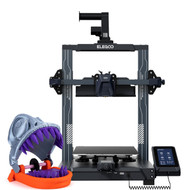
Enter the Elegoo Neptune 4 (Model TL4970).
Elegoo has built a stellar reputation over the years by delivering reliable, budget-friendly resin and filament printers. However, with the Neptune 4, they haven't just iterated on their previous designs, they have essentially supercharged the consumer "bed-slinger" blueprint. By integrating Klipper firmware right out of the box and pairing it with a robust hardware ecosystem, the Neptune 4 promises blazing speeds of up to 500 mm/s at a fraction of the cost of its competitors.
But does it actually hold up under the pressure of real-world printing, or is it just marketing hype? Let’s dive deep into every aspect of this high-performance FDM workhorse.
Technical Specifications at a Glance
Before tearing into its performance, let's look at the mechanical DNA making up the Elegoo Neptune 4 TL4970:
| Feature | Specification |
| Build Volume | 225 × 225 × 265 mm |
| Firmware | Pre-installed Klipper (ARM 64-bit 1.5G Quad-Core Processor) |
| Max Printing Speed | 500 mm/s (Recommended: 250 mm/s) |
| Extruder Type | Dual-Gear Direct Drive (5.2:1 Reduction Ratio) |
| Max Nozzle Temperature | 300°C |
| Max Hotbed Temperature | 110°C |
| Bed Leveling | 121-Point (11 × 11) Auto-Leveling + Manual Knobs |
| Cooling System | Dual 4015 Ball-Bearing Fans + Quad 4020 Auxiliary Fan Bar |
| Connectivity | WLAN (Wi-Fi), LAN, USB |
1. The Core Innovation: Klipper Out of the Box
Historically, if you wanted your 3D printer to utilize Klipper—the advanced open-source firmware that offloads heavy geometric calculations from the mainboard to a more powerful secondary processor—you had to buy a separate Raspberry Pi, flash the firmware manually, splice wires, and spend hours debugging configuration files.
The Neptune 4 changes all of that. It features a built-in ARM 64-bit quad-core processor operating at 1.5 GHz, completely pre-configured with Klipper.
Why Klipper Matters for Your Workflow
Traditional firmware like Marlin can struggle to process commands quickly enough when a machine moves at blistering speeds, causing micro-stutters that ruin surface finishes. Klipper eliminates this computational bottleneck.
(Note: While 3D printing is purely mechanical, Klipper functions much like an optimized engine computer, modulating data flow seamlessly.)
Furthermore, the Neptune 4's Klipper implementation supports two massive game-changing features:
-
Input Shaping: This technology uses advanced algorithms to predict and compensate for the physical resonance and vibrations of the printer.
By counteracting mechanical wobble, it dramatically reduces surface artifacts like ghosting, ringing, and echoing. -
Pressure Advance: This feature dynamically modulates filament flow based on print-head velocity. When the printer slows down to take a sharp corner, the pressure inside the nozzle is dropped precisely in sync, preventing corner bulging and unsightly blobbing.
2. Unboxing and Assembly
Elegoo has mastered the art of consumer packaging. The Neptune 4 arrives semi-assembled in a dense foam matrix that safely shields its components from transit damage.
For beginners, the prospect of assembling an FDM printer can be intimidating. Fortunately, the Neptune 4 can easily be put together in under 30 minutes.
Out of the box, the printer includes an accessories kit complete with tools, a nozzle-cleaning needle, a USB drive pre-loaded with slicing software, and a 1kg spool of test PLA filament.
3. The Extruder and Hotend: Engineered for High Flow
Printing at 250 mm/s or higher requires more than just fast-moving motors; it demands an extruder capable of melting and pushing plastic at a matching rate.
[Filament Spool] ---> [Filament Sensor] ---> [Dual-Gear Direct Drive Extruder (5.2:1 Ratio)] ---> [300°C Bi-Metal Hotend]
The Neptune 4 utilizes a proprietary Dual-Gear Direct Drive Extruder boasting a 5.2:1 reduction ratio. Because the extruder assembly sits directly on top of the print head (rather than being pushed through a long Bowden tube from the frame), it maintains incredibly rigid, positive control over the filament.
A True 300°C High-Temp Hotend
The hotend features an elongated design ensuring that filament spends more time in the melt zone before extrusion. Coupled with a copper-titanium bi-metal throat pipe, heat creep is effectively managed, ensuring smooth transitions and drastically reducing the likelihood of a catastrophic nozzle clog.
Because the nozzle can reach a searing 300°C, you aren't restricted to basic PLA or PETG.
4. Tidal Wave Cooling: The Auxiliary Fan Bar
One glance at the Neptune 4 reveals its most striking physical feature: a massive auxiliary cooling array mounted directly to the gantry frame behind the print head.
This assembly houses four 4020 ball-bearing cooling fans that blow a concentrated wall of air directly onto the newly printed layers. Combined with the two 4015 fans built into the print head itself, you have an unprecedented amount of cooling power.
When printing a bridge or an extreme overhang at high speeds, plastic must solidify almost instantly to avoid drooping. The Neptune 4’s aggressive cooling architecture allows it to successfully print steep geometric angles without needing excessive support structures.
A Quick Caveat on Noise: While these fans perform miracles for print quality, they are undeniably loud. When running at 100%, the auxiliary fan bar sounds like a miniature jet engine. Fortunately, Klipper allows you to adjust the fan curves, or you can switch to a "Silent Mode" via the touchscreen for slower, quieter nighttime prints.
5. Bed Calibration: Achieving the Perfect First Layer
A 3D print is only as reliable as its first layer. The Neptune 4 approach to leveling is hybrid, combining manual control with automation.
The machine features a 121-point (11 × 11) automatic bed leveling matrix.
Step-by-Step Calibration Tips for Success:
-
Manual Rough Leveling: Before running the auto-mesh, heat the bed to 60°C and use the six large adjustment knobs under the bed to roughly level the four corners using the classic "paper trick."
-
Run the Auto-Leveling: Select the automatic leveling routine on the 4.3-inch color touchscreen interface and let it construct its 121-point grid.
-
Fine-Tune the Z-Offset: This is the most crucial step. Place a sheet of copy paper under the nozzle and lower the Z-offset value in tiny 0.01 mm increments until you feel a gentle, smooth drag when moving the paper.
6. Real-World Print Performance
So, what is it actually like to print with the Neptune 4 TL4970? In a word: Revolutionary.
Standard 3DBenches that used to take well over an hour are cleanly executed in roughly 18 to 22 minutes. When printing functional parts, rapid prototypes, or intricate models like custom cookie cutters, the surface quality remains stunningly smooth at 200–250 mm/s.
Slicing and Connectivity
The printer comes out of the box with Elegoo’s customized version of Cura, but it natively supports modern slicers like PrusaSlicer and OrcaSlicer.
Because it operates on Klipper, you can connect the Neptune 4 to your local network via Wi-Fi or an Ethernet cable. By typing the printer’s IP address into any web browser, you gain access to the Fluidd web interface. From there, you can upload G-code files, monitor print progress, adjust temperatures on the fly, and even tweak firmware settings remotely without ever needing to touch an SD card.
Final Verdict: Is the Neptune 4 Worth It?
The Elegoo Neptune 4 (TL4970) represents an unbelievable value proposition for the maker community. It effectively bridges the gap between old-school slow printing and the ultra-premium, high-speed ecosystem.
Pros:
-
Pre-installed Klipper firmware delivers exceptional speeds out of the box.
-
The 5.2:1 dual-gear direct drive extruder offers pinpoint material control.
-
High-temp 300°C nozzle expands material capabilities to nylon and flexible TPU.
-
Excellent network connectivity via Fluidd web interface.
-
Highly competitive price point.
Cons:
-
The auxiliary cooling fans can be loud during high-speed operations.
-
Bed slinger design occupies a slightly larger physical footprint during operation than CoreXY printers.
Whether you are a casual hobbyist looking to minimize your wait times, an entrepreneur prototyping functional designs, or a veteran maker seeking a reliable secondary workhorse, the Neptune 4 stands out as a triumph of modern consumer engineering. It proves that you don't need to break the bank to join the high-speed 3D printing revolution.
For an absolute beginner's walkthrough covering the basics of unboxing, setup, slicing, and getting your very first print rolling cleanly, check out this comprehensive