

In the world of 3D printing, the journey from a digital file to a physical object is nothing short of magic. However, any enthusiast will tell you that the magic often comes with visible layer lines, rough top surfaces, and that unmistakable 3D-printed look. While we love the process, many makers strive for a finish that rivals injection-moulded parts, smooth, professional, and sleek.
At Cartridge World, we are committed to helping you master the art of printing. Today, we’re diving deep into a game-changing technique called Ironing, providing the perfect settings for your PLA (Polylactic Acid) projects, and showing off the hardware that makes these results possible: the latest Bambu Lab lineup.
The Quest for the Silky-Smooth Finish
If you’ve been printing for a while, you’re familiar with the staircase effect on sloped surfaces and the corduroy-like texture on flat top faces. These are the hallmarks of FDM (Fused Deposition Modeling) printing. For many functional parts, this doesn't matter. But for display pieces, cosplay props, or prototypes intended for clients, those lines can be a distraction.
This is where Ironing comes in.
What is Ironing?
Ironing is a slicer feature that tells the printer’s nozzle to run over the top layer of a print one final time after it has finished extruding the main path. During this pass, the nozzle extrudes a very tiny amount of filament while staying at a high temperature.
Essentially, the hot nozzle acts like a clothes iron, melting the ridges of the plastic and filling in the tiny gaps between the lines. The result is a flat, matte-to-semi-gloss finish that is significantly smoother than a standard print.
The Expert Insights Settings for Success
Getting ironing right requires a delicate balance. Too much heat or flow, and you’ll get ploughing (where the nozzle leaves scars in the plastic). Too little, and the gaps won't fill. Based on our expert testing, here are the gold-standard settings to use in Bambu Studio or OrcaSlicer when working with PLA:
- Ironing Speed: 25 mm/s. You want it slow enough to melt the surface but fast enough that it doesn't heat-soak the entire part and cause warping.
- Ironing Flow: 10%. This is the secret sauce. That tiny bit of extra plastic is what fills the voids.
- Ironing Line Spacing: 0.1 mm. This ensures a dense, overlapping pass that leaves no stone unturned, or rather, no line un-ironed.
- Top Shell Thickness: 1 mm. Having a solid base of 1mm (usually about 5 layers at a 0.2mm layer height) provides enough structural integrity so that the ironing pass doesn't collapse into the infill.
By enabling these simple adjustments, you move your hobbyist prints into the realm of professional manufacturing.
Upgrade Your Workspace: The Bambu Lab Revolution
Of course, software settings only go as far as your hardware allows. If you’re tired of constant bed leveling, clogged nozzles, and slow print speeds, it might be time for an upgrade. At Cartridge World, we are currently hosting a massive 3D Printer Sale on the industry leaders: Bambu Lab.
1. The Workhorse: Bambu Lab P1S Combo
Sale Price: $1,250
The P1S has quickly become the gold standard for enthusiasts who want set it and forget it reliability. It features a fully enclosed design, which is essential if you ever want to venture beyond PLA into materials like ASA or ABS that require heat retention.
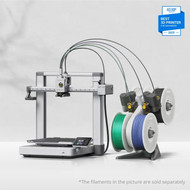
The Combo version includes the AMS (Automatic Material System), allowing you to print in up to four colors simultaneously. Imagine printing a logo directly into your part or using dedicated support material for a perfect finish, all without manual intervention.
2. The Entry-Point Powerhouse: Bambu Lab A1 Combo
Sale Price: $638
If you’re looking for incredible value, the A1 is a bedslinger redefined. It’s fast, quiet, and incredibly user-friendly. Like its bigger brothers, it features active flow rate compensation and tangle detection. The A1 Combo also includes the AMS Lite, bringing multi-color 3D printing to your desk at a price point that was unheard of just two years ago.
Why 3D Printing Fits the Cartridge World Mission
You might know us best for keeping your 2D printers running with the best ink and toner in Australia, but 3D printing is the natural evolution of Trusted Printing Solutions.
Whether you are printing a replacement part for a household appliance, a custom ergonomic handle, or a creative masterpiece, the philosophy is the same: you need reliable equipment and high-quality consumables. We carry a wide range of filaments that pair perfectly with the ironing techniques mentioned above, ensuring your projects never stall.
Join the Community: See What We’ve Been Up To!
3D printing is more than just a utility; it’s a community. We’ve been busy behind the scenes at Cartridge World, experimenting with new prints, testing different filament brands, and sharing store moments that we think you’ll love.
We invite you to follow us on Instagram to see our latest reels. From satisfying time-lapses of the Bambu Lab machines in action to close-up shots of ironed surfaces, our social media is the best place to get daily inspiration.
Final Thoughts
The jump from good to great in 3D printing often comes down to small, incremental changes. By mastering the ironing setting, you're giving your work a professional edge that stands out. And with the current deals on Bambu Lab hardware, there has never been a better time to invest in a machine that can keep up with your creativity.
Visit your local Cartridge World or shop online today to grab these Hot Price Deals before they’re gone. Happy printing!